Homeworks, as stated in the syllabus, are made up of one main programming section and an optional Section for the previous standard. There might be additional contextual information beforehand such as a passage to read or engage with from the textbook, however that won't always be the case.
The programming portion of the Homework, since it can't exist purely here on my site, will be in Github Repositories given through Github Classroom. I will give a description of each of the files on this page (if there happens to be more than one) and will give you extra information describing the assignment when necessary. For convenience I will also point out where, and which, files have TODO sections in them so that you don't have to go "digging" to complete your homework. (In Rust we actually use the "unimplemented!()" macro rather than TODO as a comment, but the idea is the same)
You will always simply be given an existing repository and then you will be directed to fill in the "skeleton". This does NOT mean I won't ever ask you to do things, like making your own function, class, or other advanced data structures, just that It will be clear where and what you are trying to do. Normally I would mention some information about imports here, but since we are using Rust, we don't have to worry about that! (Yay!) Rust natively handles "imports" via external crates and the toml file. So you'll never have to add any crates directly! They will be added on first build!
At the bottom of most homeworks you will find the optional homework for the previous standard. These are creative endeavor/real-world uses and they are always open ended and available for modification to fit a passion of yours! That portion of the site will almost always be smaller and will give guidance on what your are trying to do with your creative endeavor to ensure you gain points. Most of it will be made of up "ideation" or "brainstorming" for what you could do to get your "creative juices flowing".
Now that we've described what homeworks look like at a high level, lets meet your practice homework, which features the 2 sections described above!
This homework assignment is about getting used to the flow of receiving our code skeleton as a template repository from GitHub Classroom. The content of this homework will be to make a simple calculator function in rust. It is a very simple problem, since we are only trying to get familiar with the process of receiving, completing, and turning in HW.
This section is just here as an example to display what it would look like if I asked you to read a specific section of the textbook for the homework assignment.
It will also outline the sections of the textbook that are relevant to the information covered in class.
For instance, in this homework I would like you to begin reading the rust language book! (Linked in the required resources section of the syllabus) Specifically, I would like you to read what is specified below!
In "The Rust Language Book", read Foreword, Introduction, and Ch 1: Getting Started
Get familiar with the GitHub Classroom workflow and basic Rust project structure.
Your repository will contain the following files:
CMSI-3510-HW0/
āāā .gitignore
āāā hw0/
ā āāā Cargo.toml
ā āāā src/
ā āāā add.rs
ā āāā divide.rs
ā āāā multiply.rs
ā āāā subtract.rs
ā āāā lib.rs
ā āāā main.rs
āāā README.md
For the programming section of this homework we will be getting used to the flow of receiving our code skeleton as a template repository from GitHub Classroom and using cargo doc to generate the documentation site for all the information in the homework.
The content of this homework will be to make all the unit tests pass for the calculator functions in the "src" folder. Running the cargo test command should have all the tests pass.
NOTE!!! Past this point make sure you are signed into the github account you wish to use for schoolwork. If you have multiple, make sure you do not have the wrong one signed in as your account will be attached to my class from then on!
ANOTHER NOTE!!! If at any point you are following the instruction down below and are finding it difficult, you don't remember how this works, or you've never done this before; I have made a video tutorial displaying the entire process from start to finish. A link to it is provided via the button below:
Since, via GitHub Classrooms rules, you are joining the class for the first time you will be prompted to identify yourself. It should be pre-populated with everyone's names and all you need to do is find yours and select it, then you can accept the HW assignment and it will automatically make a repository for you on GitHub. If you manage to select the wrong name it will bind you to that name, meaning you become that individual. If this happens on accident, email me so that I can unbind you from that name and you can try again. (Don't get this wrong otherwise you are violating LMU policy on classroom behavior! Remember? Nothing illegal, and this is Identity Fraud! Luckily I can bail you out, but I won't always be able to...)
Once you've accepted the assignment, clone the repository locally to your device and run cargo doc --open to generate the site for engaging with the HWs. After reading the docs, use the IDE of your choice to edit the files to pass the unit tests.
To run the unit tests, open a terminal (VSCode's built in terminal is convenient here), ensure your working directory is on the same "level" as the src folder inside the hw0 folder, and type the cargo test command into your terminal and hit enter.
Tip: Keep in mind that your terminal lives in your devices file structure system! The level you are on refers to the depth of the folder you are in! If you aren't sure where your terminal instance is located, use
pwd(print working directory) to see which folder you are in. If you aren't in the right spot remember to usecd(change directory) to navigate to the correct folder!
Once you are passing all the tests make sure to use your git commands to add your changes, commit them, and then push them to the cloud repository so I can grade it! This is "turning in the code" to me so I can grade. However, as an extra step, go to brightspace and find the "Programming" HW0 assignment and just turn in a small message as an indicator to me you are done! (I need you to do this so I can track any special accommodations coming from the excused late policy!)
You can find the GitHub Classroom assignment link and the Brightspace turn in link using the buttons at the top of this section.
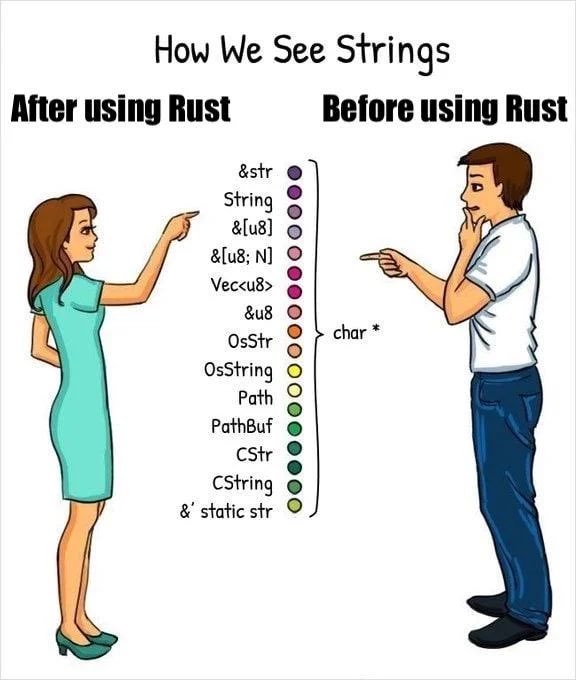
The creative endeavor I'd like you to embark on for this homework is simple. I'd like you to submit to me something you identify with. Whether its an arts and crafts project you are working on, a painting you are making, a game you love to play, a meme account you like to follow, a video of a search algorithm you like to watch work, or anything that you publicly enjoy and are fine sharing with me. Whatever it happens to be, give me a snap shot of it with no explanation. Just send a picture, a pdf, or whatever format Brightspace will let you turn in. As an example I have provided a meme Dr. Toal showed me about handling strings in Rust. If you don't get it, don't worry! I didn't either! However it hit me much later in the semester after I had been working with Rust for a while!

Submit your creative share using the submission button at the top of this section!